
netsuite-articles
NetSuite articles
NetSuite SuiteApprovals: Setup, Uses & Limits
Learn when to use NetSuite SuiteApprovals, how approval rules work, and where custom workflows may be better.


netsuite-articles
Summarise the article with your AI:



Budgets do not create control by themselves. In NetSuite, a standard budget gives finance teams a planning baseline, but NetSuite budget validation helps turn that baseline into day-to-day spending control.
For growing companies with several subsidiaries, departments or approval layers, the real challenge is making sure purchase requests, purchase orders and vendor bills stay aligned with the budget. This guide explains how budgets work in NetSuite, how to import them, and how to use budget validation to improve spending control. For a broader overview of NetSuite ERP and its finance capabilities, see our NetSuite solution page.
NetSuite budget validation checks expense transactions against an available budget. With the Expense Commitments and Budget Validation SuiteApp, companies can validate purchase requests, purchase orders and vendor bills against budgets defined by account, period and segment.
It helps finance teams answer three practical questions:
Standard budgets support financial planning and reporting. Budget validation adds a control layer to help teams manage spending as transactions are entered.
A standard NetSuite budget usually covers one fiscal year. Finance teams enter budget amounts by account and accounting period. In NetSuite OneWorld, budgets can also be associated with a subsidiary. Budgets may include dimensions such as customers or projects, items, classes, departments and locations, depending on the configuration.
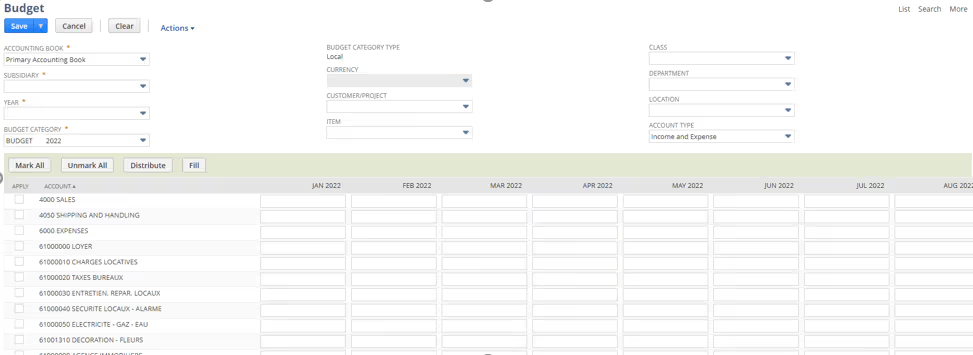
The level of detail matters. A budget that is too high-level may not provide useful insight, while one that is too granular can become difficult to maintain. Choose dimensions that match how finance and budget owners actually review performance.
To create a standard budget, go to:
Transactions > Financial > Set Up Budgets
Set the fiscal year, subsidiary if applicable, budget category, account type and relevant dimensions. Budget categories can help distinguish versions such as an original budget and a reforecast.
Before entering or importing data, agree on which accounts and dimensions to use, who owns budget updates, and how many budget versions the business needs. These decisions are easier to manage before reporting and validation rules depend on them. For help aligning NetSuite configuration with finance processes, explore Novutech’s NetSuite consulting services.
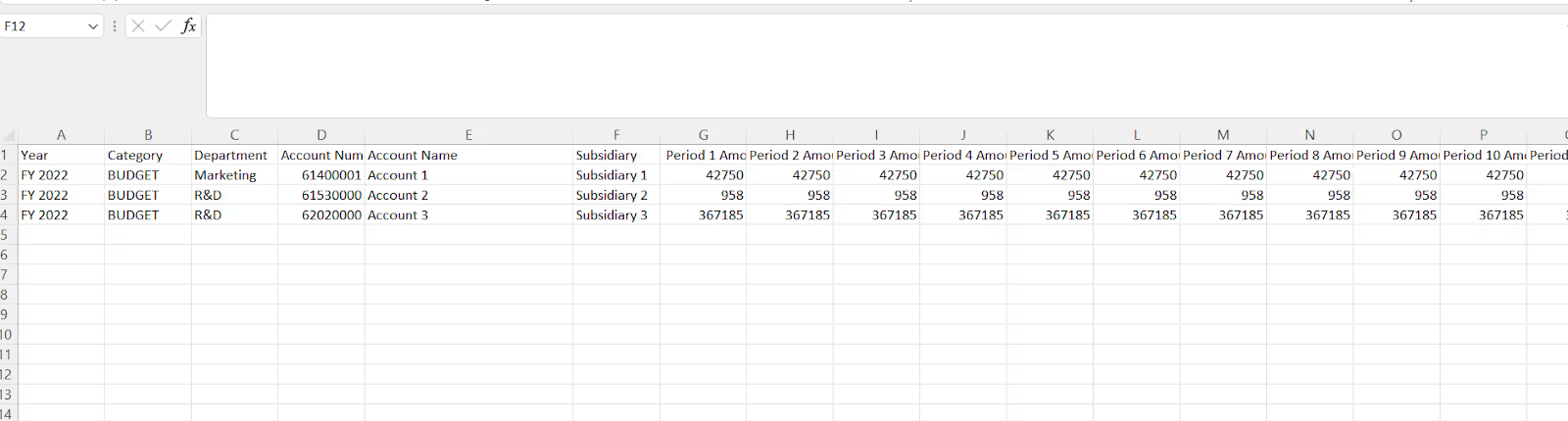
NetSuite supports budget imports using a CSV file. This can be useful when the budget is prepared in Excel or exported from another planning tool.
Go to:
Transactions > Financial > Set Up Budgets > Import
Download the budget template, complete it, upload the CSV file and review the field mapping before starting the import.
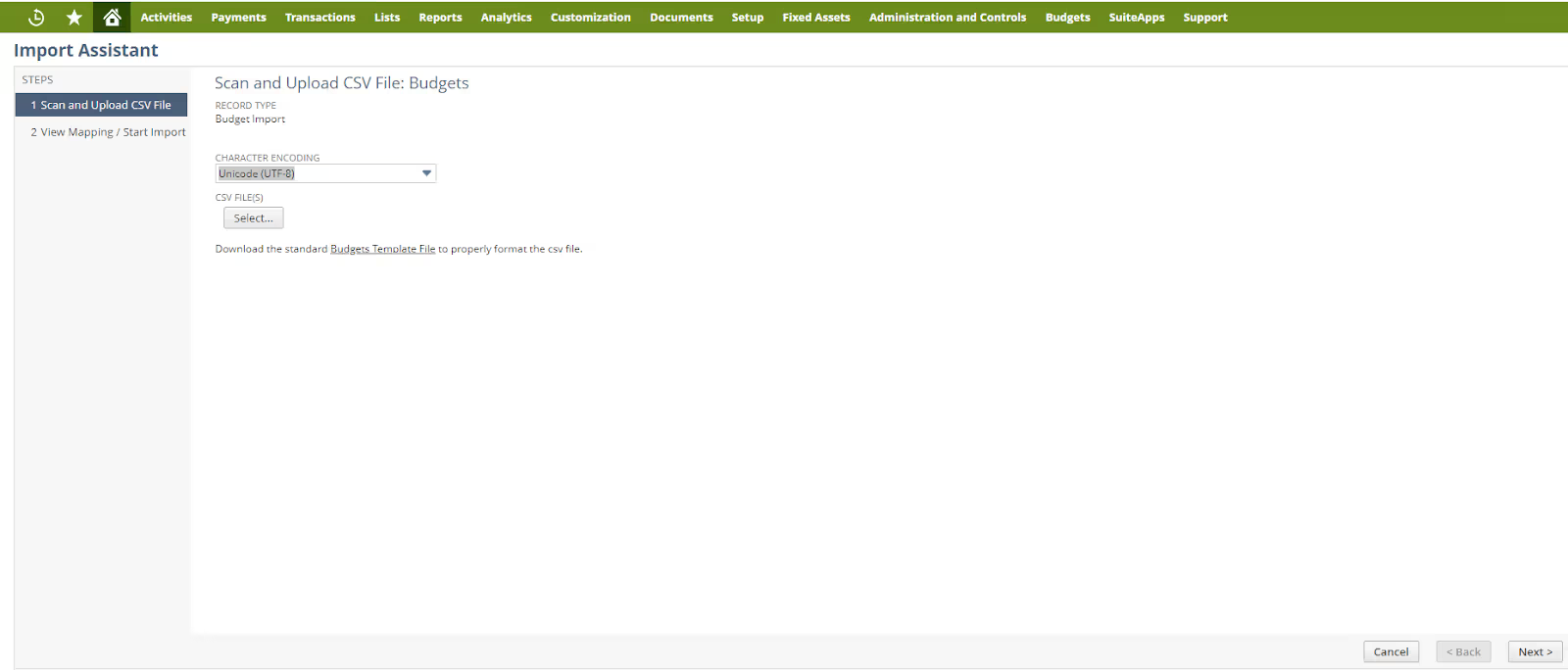
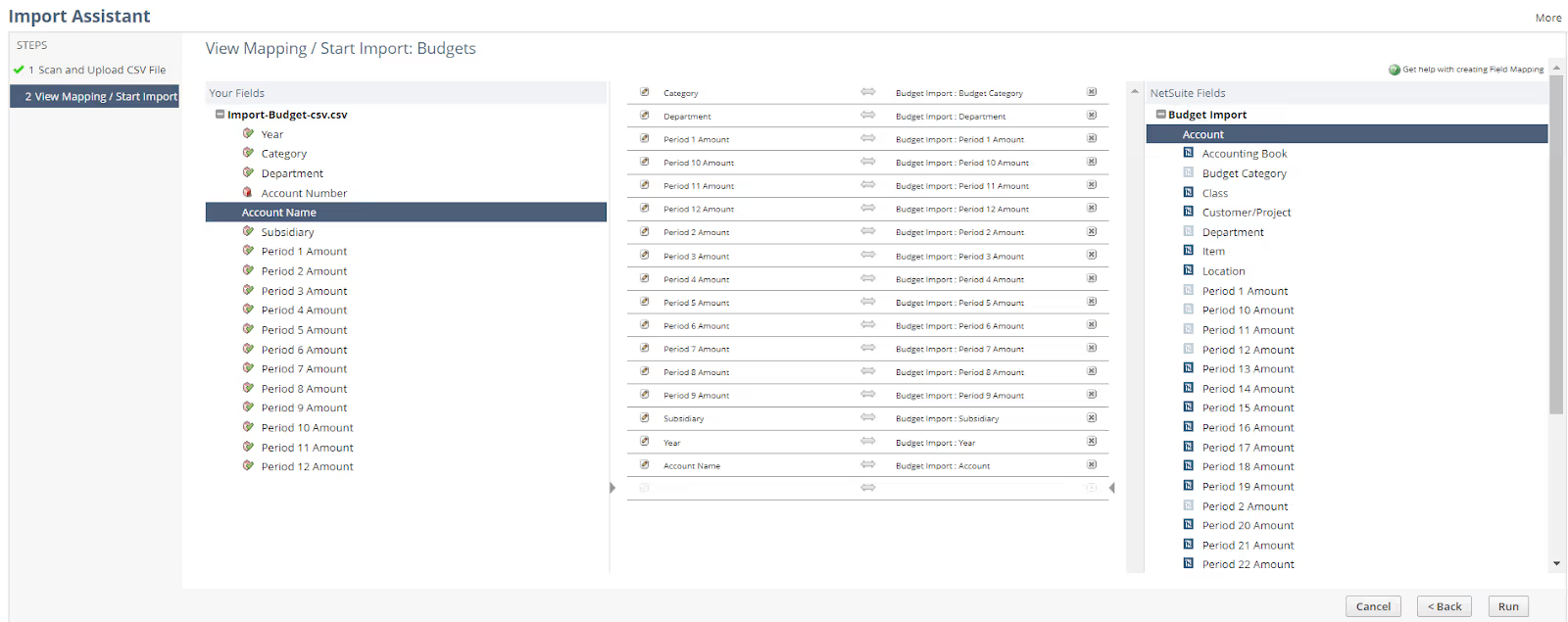
Before importing, check that the fiscal year exists in NetSuite, the budget category is correct, account values are mapped properly and segment values match those already configured in the system.
Take particular care when updating an existing budget: a CSV import can overwrite existing budget data. Validate the file before running the import.
The Budget vs Actual report compares planned amounts with posted transactions. It can help identify overspend by department or account, underused budgets, revenue shortfalls and variances that need follow-up.
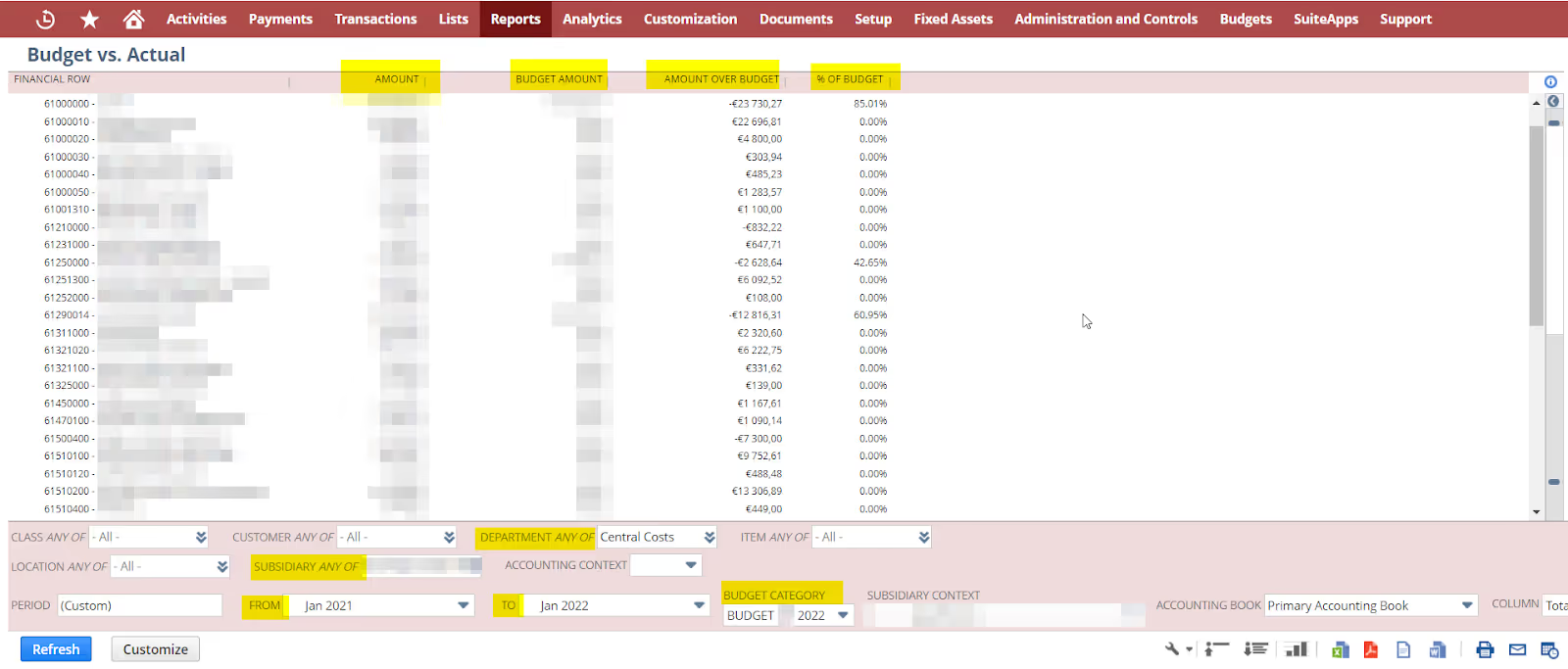
Agree on how your team calculates and describes variance. For example, finance teams may use “Actual minus Budget” or “Budget minus Actual”; the convention affects how favorable and unfavorable expense variances appear.
The report is most useful when it leads to action: budget owners should be able to understand what changed, why it changed and what needs attention. For more on reporting and planning capabilities, see Novutech’s finance and BI solutions.
The Expense Commitments and Budget Validation SuiteApp adds a control layer to NetSuite budget management by checking transactions against available budget.
It considers both actuals and commitments:
This distinction gives finance visibility over spending before an invoice is posted. An open purchase order, for example, may already use part of a department’s available budget.
Budget control defines what happens when a transaction exceeds the available budget. Go to:
Budgets > Setup > Budget Control > New
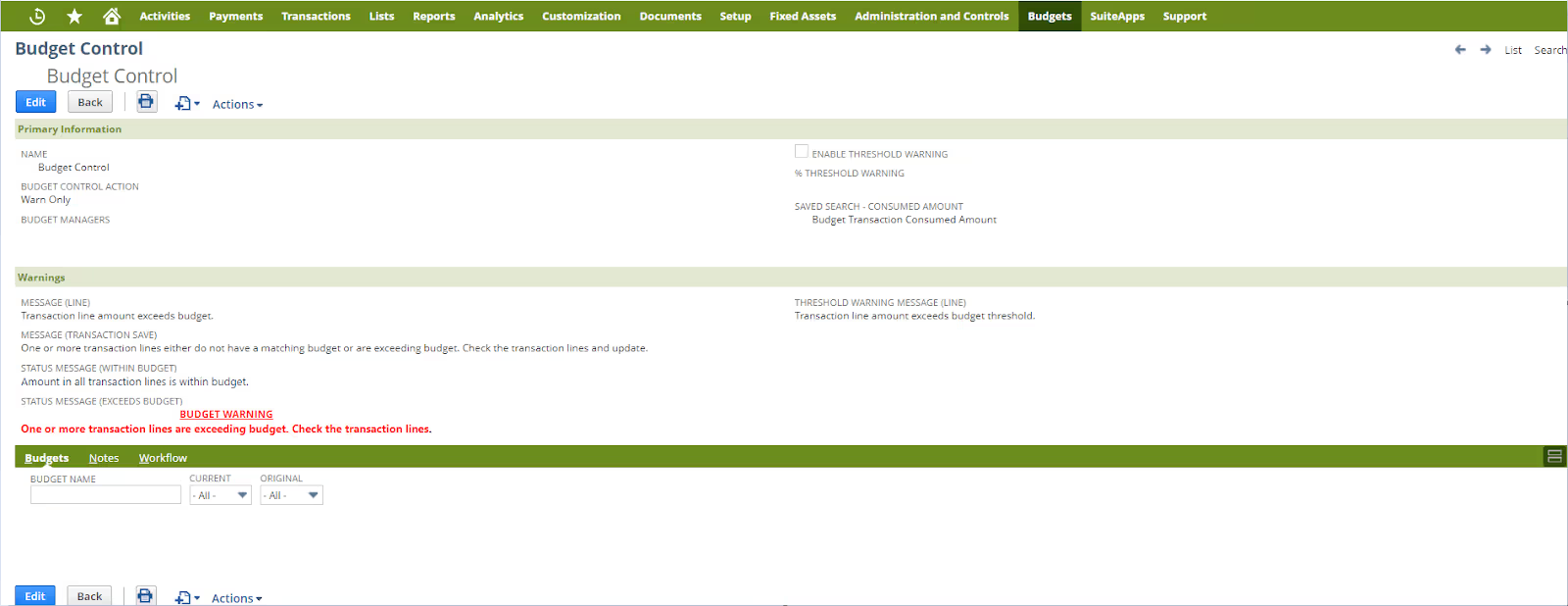
The main options are:
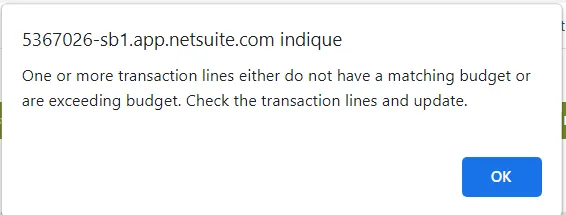
Some teams start with warnings to understand how the controls affect day-to-day work, then introduce stricter rules where needed. Blocking transactions can strengthen governance, but the budget model must be complete enough to avoid disrupting valid purchases.
Budget validation must be enabled in the budget preferences and, in OneWorld environments, on the relevant subsidiary record.
Go to:
Budgets > Setup > Budget Preferences
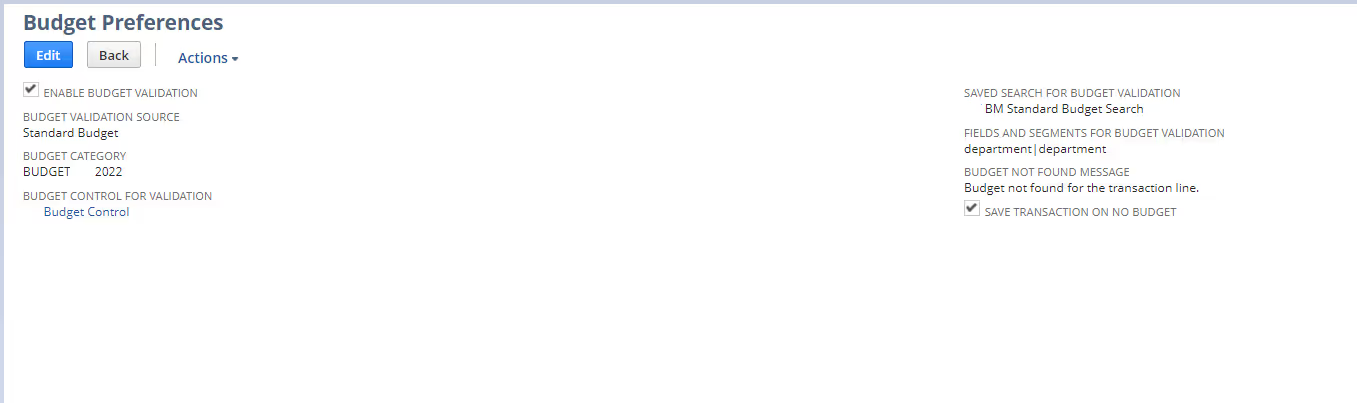
Review the settings for the validation source, budget category, budget control, segments and transactions with no matching budget. Allowing a transaction to save when no budget exists gives users flexibility, but may reduce control. Blocking it provides stricter governance, provided budgets have been set up for the relevant transactions.
Budget validation can inform approval routing. For example, a purchase order within budget may follow the standard approval path, while one outside budget may require additional review from finance or the CFO.
This adds budget status to the approval decision rather than relying on transaction amount alone. For more detail on approval rules and routing, read Novutech’s guide to NetSuite SuiteApprovals.
Budget validation is more likely to work well when the budget model and process are clear. Watch out for these common issues:
Novutech helps European growth companies configure NetSuite around their finance processes. With 250+ customers, 65+ experts and 100+ certifications, our teams support companies from implementation through optimization and long-term support.
We can help with budget model design, CSV imports, Budget vs Actual reporting, Expense Commitments and Budget Validation, control rules and approval workflows. Learn more about our NetSuite implementation approach.
The goal is not to add control for its own sake. It is to build a budgeting process that finance can trust and budget owners can use.
If your team still manages budgets in spreadsheets, validates spend manually or spots overspend too late, it may be time to review your NetSuite setup.
Novutech can help assess your current configuration and define a budget validation process that supports financial control without unnecessary friction.
NetSuite budget validation checks purchase requests, purchase orders and vendor bills against available budget. It helps identify whether a transaction is within budget, exceeds budget or has no matching budget.
Standard budgets support planning and reporting. To control spending during transaction entry, companies can use Expense Commitments and Budget Validation with budget control rules.
Actuals are posted expenses, such as vendor bills. Commitments are expected expenses, such as purchase orders or purchase requests that have not yet become bills.
Yes. Budgets can be imported into NetSuite using a CSV file. Prepare the data, map the fields and review the import before running it.
It depends on the company’s governance model. Some companies start with warnings, while others use “prevent save” rules where stricter control is needed.
Let's discuss how we can help you move from complexity to clarity.