
broad-erp-tech
Broad ERP/Tech
NetSuite AI Connector: MCP Use Cases
Learn how NetSuite AI Connector uses MCP to connect ERP data, AI tools and finance workflows securely in 2026.


netsuite-articles
Summarise the article with your AI:

For NetSuite customers, the AI Connector represents what we see "as important to NetSuite as the day they made Web APIs available." This isn't just another feature, it's a game-changing investment from NetSuite that transforms your ERP into an intelligent assistant capable of real-time business analysis.
NetSuite has made a substantial investment in AI infrastructure, creating a secure bridge between your business data and large language models that opens up entirely new possibilities for how you interact with your ERP system.
The NetSuite AI Connector is a protocol-driven integration service supporting Model Context Protocol (MCP) that provides a secure, flexible, and scalable way to connect AI to NetSuite. Think of MCP as an API but for large language models. Currently, it works exclusively with Claude Pro, though expansion to other platforms is expected "sooner rather than later."
Instead of building complex reports or waiting for IT to create custom dashboards, you can now have natural conversations with your NetSuite data:
The AI automatically selects the right data sources, runs sophisticated queries, and provides business-ready insights in seconds (if prompted correctly, that is).
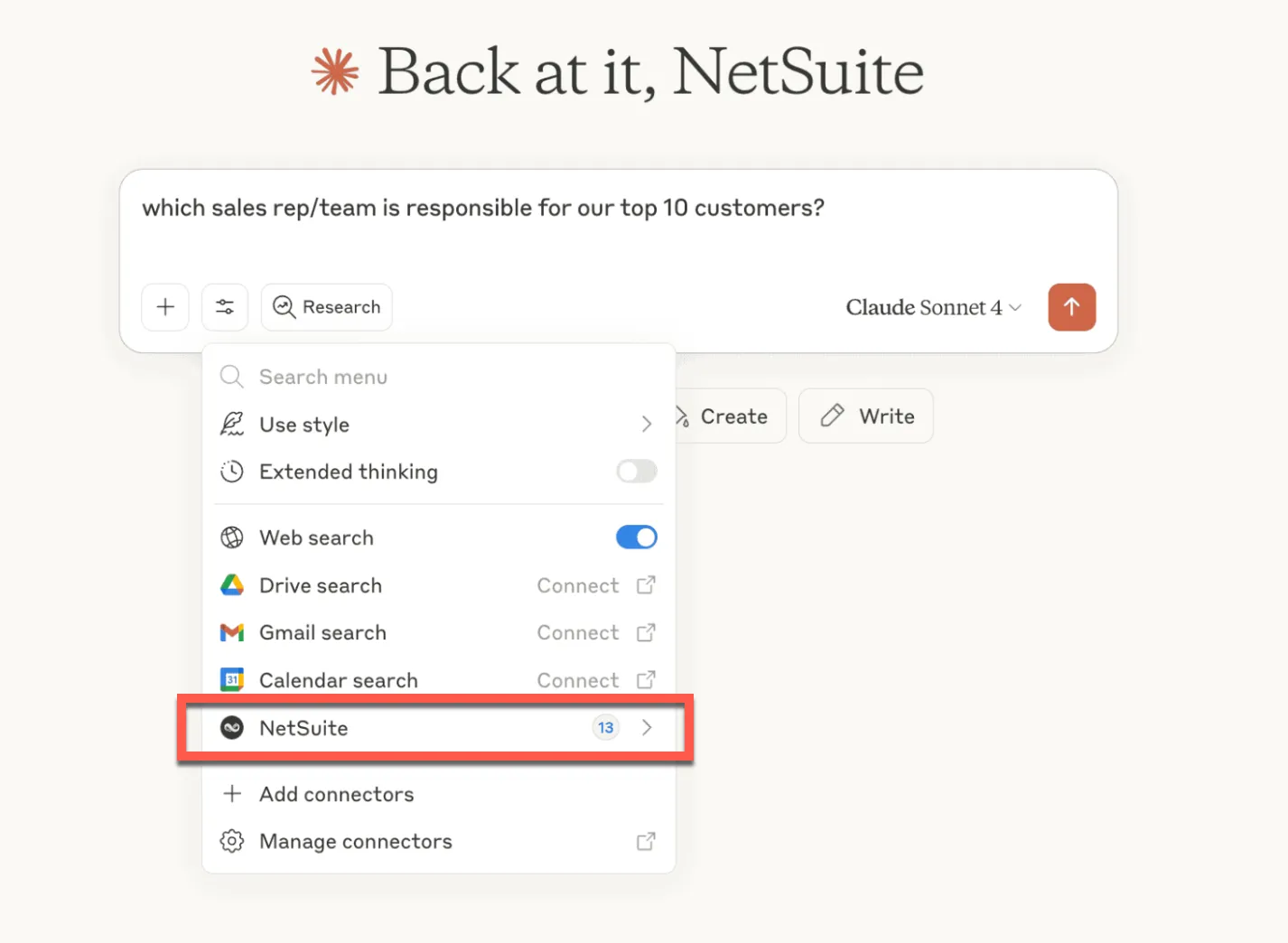
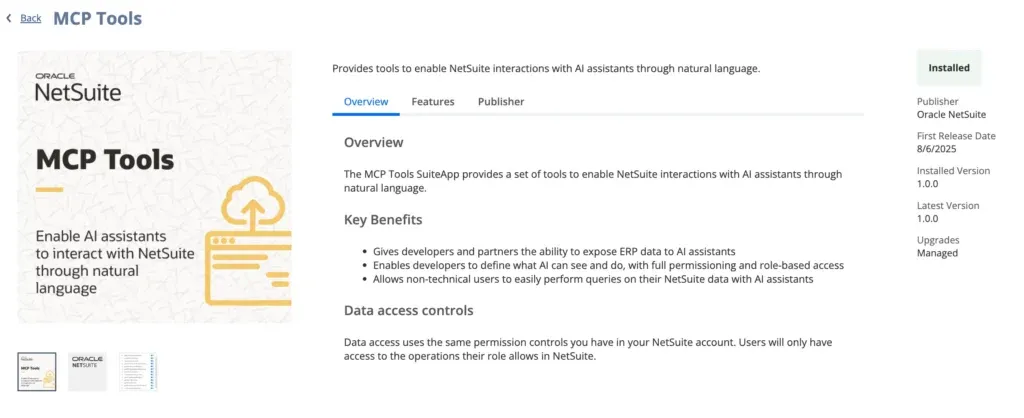
Step 1: Install MCP Tools SuiteApp
Step 2: Create Custom Role
⚠️ Critical: Administrators cannot work with MCP - you must create a custom role
Required permissions for the custom role:
Step 3: Configure Connection
Instead of clicking through multiple screens or importing CSV files, you can simply have a conversation with your NetSuite data. If you follow the above steps, connect NetSuite MCP to Claude, and then ask it to list you your top 10 customers by revenue and analyze your sales reps’ performance, you can expect an output like this:
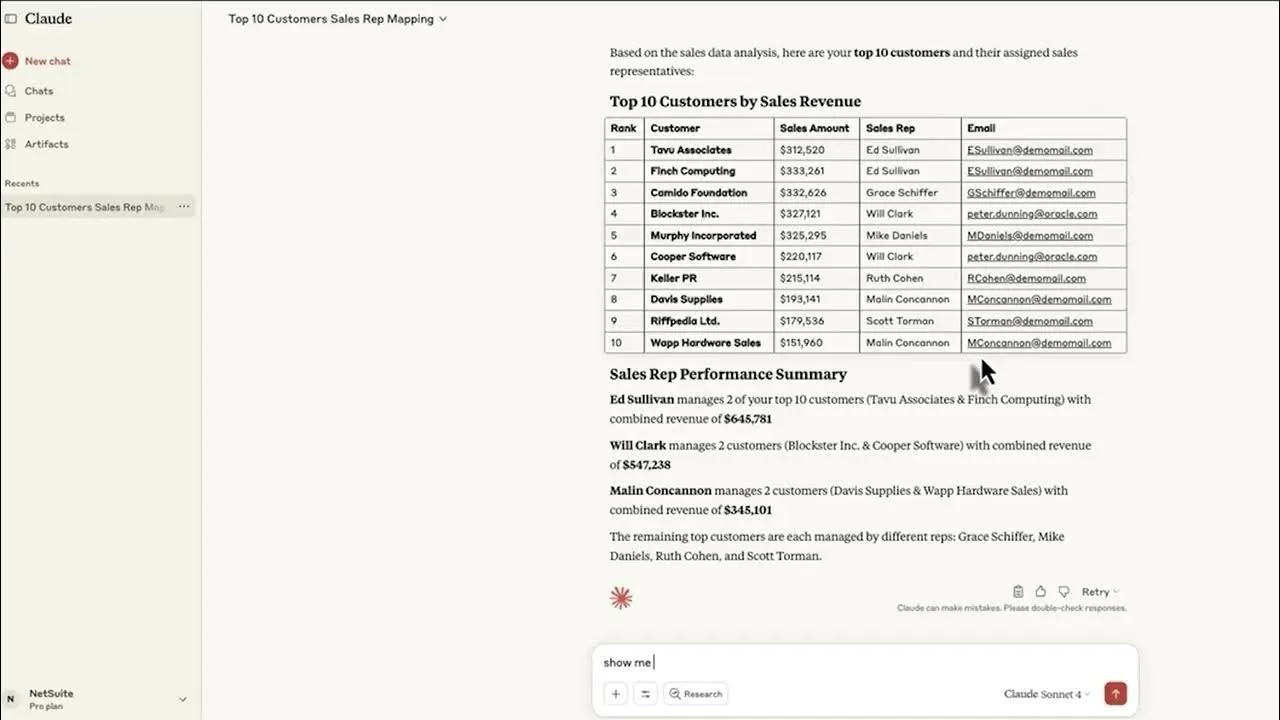
This isn’t a futuristic possibility - this works today with NetSuite's AI Connector. Or rather, it works after some dedicated customization work, specific prompting techniques and a few rounds of testing until the correct guidelines are given to the LLM. However, the biggest impact comes from eliminating the small, repetitive tasks that consume hours each week:
- No more CSV formatting and import errors
- Instant access to business insights without building reports
- Bulk operations completed in minutes, not hours
- Real-time monitoring instead of periodic manual checks
Getting Started: Pick one repetitive task your team does weekly, like generating customer reports or updating inventory, and try the conversational approach.
Novutech offers specialized services to help NetSuite customers implement and optimize AI Connector solutions. Our expertise covers the full spectrum of AI opportunities:
Strategic AI advisory:
Custom development:
Implementation support:
Our approach is based on real-world experience with 250+ NetSuite implementations and optimizations, ensuring AI projects deliver measurable business results while maintaining security and compliance.
Contact our NetSuite AI specialists to discuss your specific transformation journey and develop a proof of concept tailored to your business needs.
The AI Connector respects NetSuite's existing role-based permission structure, ensuring that AI interactions maintain the same security boundaries your team already operates within. Users can only access data they're already authorized to see in NetSuite.
Key security features:
Data processing policies:
Based on direct inquiry with Claude about MCP data handling:
GDPR and Compliance Considerations:
There are security and compliance concerns that need to be considered, particularly for companies with GDPR or similar requirements. However, for most companies, using Claude with the NetSuite AI Connector is "much safer and more compliant" than initially feared.
Current technical limitations:
Performance considerations:
Important Limitation: The AI Connector doesn't provide NetSuite report data to MCP clients like Claude. This means standard NetSuite reports (Income Statements, Balance Sheets, etc.) aren't directly accessible without additional configuration.
Workaround Solutions:
Expected Enhancements:
The next phase will focus on "AI that not only analyzes, but acts on its insights" with "automations that directly improve efficiency and scalability." This represents where "the 'big money' is going to be made."
The NetSuite AI Connector represents a strategic transformation opportunity that marks the beginning of a new phase for NetSuite and its ecosystem, opening the door to democratized AI and new competitive dynamics across all industries.
For NetSuite customers, this isn't about replacing your team, it's about making them more strategic, responsive, and valuable to the business.
Ready to transform your NetSuite experience with AI?
At Novutech, we've helped 250+ companies optimize their NetSuite implementations with a practical, results-driven approach. Our expertise in both NetSuite and AI integration ensures implementations that deliver measurable business results while maintaining security and compliance.
Contact our NetSuite AI specialists to discuss your specific transformation journey and develop a proof of concept tailored to your business needs.
NetSuite AI Connector is protocol-driven integration service supporting Model Context Protocol (MCP) providing secure bridge between NetSuite data and large language models like Claude Pro. Instead of building complex reports, have natural conversations with your ERP asking questions like "Which customers have highest DSO?" AI automatically selects data sources, runs queries and delivers business insights in seconds.
Three-step installation: install MCP Tools SuiteApp from SuiteCloud Marketplace, create custom role with MCP Server Connection and OAuth permissions (administrators cannot use MCP), configure connection using NetSuite server URL format and connect through Claude Pro settings. Test with basic queries to verify setup. Custom role assignment required for each user needing AI access.
AI Connector respects existing NetSuite role-based permissions ensuring users only access authorized data. All queries maintain same security boundaries as NetSuite interface. No model training without explicit consent under Claude's standard privacy policies. Existing audit trails and compliance frameworks preserved. No additional security vulnerabilities introduced through AI access layer.
Three key constraints: limited exclusively to Claude Pro with multi-platform expansion expected, requires SuiteQL knowledge for advanced analysis and SuiteScript expertise for custom tools, standard NetSuite reports not directly accessible without additional configuration. Workarounds include developing custom tools for File Cabinet reports or using SuiteQL queries for underlying transaction data access.
Eliminates repetitive manual tasks consuming hours weekly including CSV formatting errors, instant business insights without building reports, bulk operations completed in minutes versus hours, and real-time monitoring replacing periodic checks. Strategic value transforms team from operational to strategic focus making them more responsive and valuable. Future evolution toward agentic AI enabling autonomous actions.
Let's discuss how we can help you move from complexity to clarity.