
broad-erp-tech
Broad ERP/Tech
NetSuite AI Connector: MCP Use Cases
Learn how NetSuite AI Connector uses MCP to connect ERP data, AI tools and finance workflows securely in 2026.


broad-erp-tech
Summarise the article with your AI:



Dust for NetSuite helps companies scale AI beyond individual ERP prompts by turning NetSuite data into governed, cross-functional AI agents. While the NetSuite AI Connector enables powerful individual interactions with ERP data, scaling AI across an entire organization requires an enterprise orchestration platform.
Dust transforms individual AI capabilities into enterprise-wide intelligence. It connects NetSuite with 50+ business tools to support cross-functional insights across finance, sales, operations, customer success and management workflows.
As demonstrated at Grow with NetSuite Paris 2025, Novutech combines NetSuite AI Connector expertise with Dust to deliver enterprise AI solutions that break down data silos and transform how organizations work.
Dust for NetSuite is an enterprise AI setup where Dust acts as the orchestration layer for the NetSuite AI Connector. NetSuite provides governed ERP data access, while Dust helps teams build custom AI agents that connect ERP data with other business tools and workflows.
Dust is an enterprise AI platform designed for building custom AI agents that connect to multiple business tools simultaneously. For NetSuite users, this means Dust can extend the value of the NetSuite AI Connector beyond individual conversations with ERP data.
Think of Dust as the layer that turns isolated AI interactions into reusable, scalable AI workflows. Instead of asking one-off questions to NetSuite, teams can create agents for specific business needs, such as revenue analysis, customer account preparation, inventory planning or churn risk detection.
This makes Dust especially relevant for companies where business context is spread across multiple systems. Finance may work in NetSuite, Sales may rely on CRM, Customer Success may track tickets and product usage, while leadership needs a consolidated view across all of them.
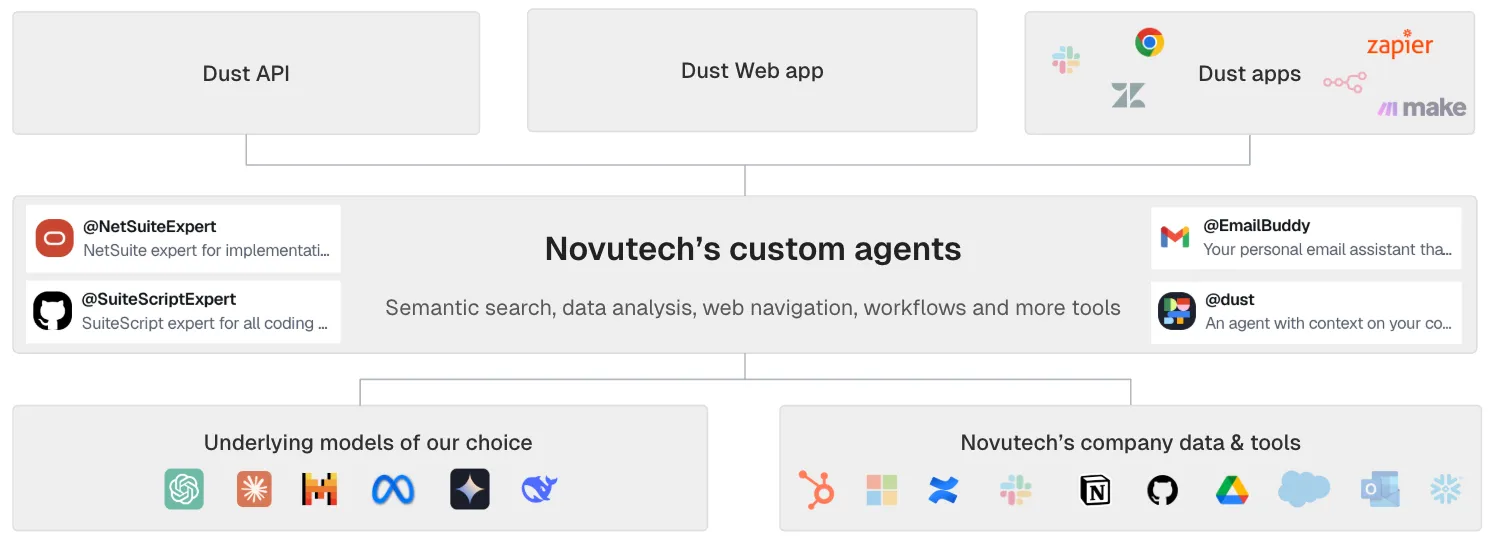
The NetSuite AI Connector gives AI tools secure access to ERP data. Dust helps scale that access by turning it into reusable AI agents across departments.
The NetSuite AI Connector enables users to interact with NetSuite data through AI. Dust builds on this foundation by connecting NetSuite with other business applications and allowing teams to design agents around specific workflows.
For example, a finance user may use NetSuite AI Connector to ask questions about revenue, cash flow or receivables. With Dust, that capability can be extended into an agent that also considers CRM data, customer context, support history, internal documents or operational metrics.
The result is not just a smarter chatbot. It is a more connected way to work with business data.
Dust is particularly useful when teams need answers that depend on several systems, not only ERP data. That is where AI orchestration becomes valuable: it allows the agent to combine context from multiple tools while respecting the permissions and governance rules already in place.
Dust helps NetSuite users create, govern and scale AI agents across the enterprise. Its main value comes from no-code agent creation, broad tool connectivity, enterprise security and collaborative development.
Dust enables business users to build agents without programming knowledge. Users can define what they want the agent to do, select the relevant data sources and configure permissions through a visual builder interface.
For NetSuite users, this means finance, sales or operations teams can create agents for recurring workflows without needing custom development for every use case.
Dust can connect to NetSuite, Salesforce, Google Workspace, Slack, Notion, GitHub, HubSpot, Zendesk and dozens of other business systems.
This matters because many business questions cannot be answered from NetSuite alone. A customer profitability question may require ERP data, CRM context and support history. A churn risk question may require billing data, product usage and customer feedback.
By connecting these systems, Dust supports broader NetSuite integration across the business tech stack.
Enterprise AI only works if access is controlled. Dust provides role-based access control, comprehensive audit logging, data residency options for regulatory compliance and industry-standard certifications such as SOC 2 and GDPR.
This is particularly important when AI agents interact with finance, customer, supplier or operational data.
Dust also supports collaborative development. Teams can share agents across the organization, improve existing agents based on usage patterns, build on proven templates and scale successful use cases faster.
This helps companies avoid scattered AI experimentation and move toward repeatable enterprise AI adoption.
Scaling NetSuite AI requires a phased approach: start with focused use cases, connect additional business tools, then expand with governance. This helps companies build momentum while managing risk.
Successful AI scaling is not about launching as many agents as possible. It is about proving value, measuring adoption and creating a governance model that allows AI to grow safely.
The first objective is to prove value with minimal risk and investment.
Start with one or two power users who understand both business processes and technology. At this stage, connect only NetSuite via AI Connector to minimize complexity and keep the focus on ERP data.
The goal is to experiment with simple queries, build confidence and document useful prompts, workflows and lessons learned. This phase should identify two or three high-value use cases that deserve deeper development.
Success can be measured through practical indicators:
The second phase expands the scope and starts to demonstrate ROI.
At this stage, expand to five to ten users across different functions such as Finance, Sales and Operations. Connect additional data sources beyond NetSuite, such as Salesforce, Google Drive or internal databases.
This creates a more complete ERP AI automation ecosystem. Agents can now answer questions using both NetSuite data and the wider business context.
The focus should be on building two or three custom agents addressing specific business needs identified in Phase 1. Feedback should be gathered through surveys and interviews, and teams should measure time savings, quality improvements and user satisfaction quantitatively.
Success in this phase means documented ROI, three or more functional agents in regular use, organic user growth through word-of-mouth and executive stakeholders requesting demos.
The third phase is enterprise-wide deployment with governance.
Companies can roll out agents to broader user groups organized by function or department. Departments can create their own agents for specific needs, while still following shared standards.
At this stage, Dust connects multiple data sources and supports more sophisticated cross-functional agents. This is where AI orchestration becomes most valuable: agents are no longer isolated experiments, but part of the company’s operating model.
To scale responsibly, companies should build a center of excellence to share best practices and templates. They should also establish governance policies covering data access, usage guidelines and compliance.
Success can be measured by 50+ active users across multiple departments, 10+ agents in production, measurable impact on company KPIs and AI adoption included in performance goals.
The strongest Dust and NetSuite use cases are cross-functional workflows where ERP data needs to be combined with CRM, support, operations or collaboration data.
Dust is most valuable when agents bring together information that would otherwise remain spread across different systems. Below are practical examples for Sales, Finance, Operations and Customer Success.
A sales AI agent can help sales representatives prepare for customer conversations with richer context and less manual research.
For example, a sales rep preparing for a customer call could ask: “Prepare me for my call with Acme Corp.”
The agent can combine NetSuite financial data, Salesforce CRM data, HubSpot marketing engagement, Zendesk support tickets and Slack communications. The response can include a company overview, key decision-maker contacts, payment history, current AR balance, recent marketing engagement, open support tickets, satisfaction signals, internal discussions and suggested talking points.
The business impact is better preparation. Sales teams enter calls with a complete customer briefing, which can support more productive conversations, faster deal cycles and higher win rates.
A finance AI agent can help CFOs and finance teams move faster from data collection to business analysis.
For example, a CFO could ask: “Why did our unit economics decline last quarter?”
The agent can analyze NetSuite transactions and accounting data, BambooHR headcount and organizational data, internal operational metrics and external market data. It can structure an answer around revenue trends by product line and customer segment, cost structure changes, headcount growth, customer acquisition cost trends, customer lifetime value calculations, operational efficiency metrics and market dynamics.
The business impact is faster decision-making. Executives can receive comprehensive analysis in minutes instead of days through NetSuite integration with enterprise data sources.
Discover how the NetSuite AI Connector enables conversational ERP access!
An operations AI agent can help teams make better inventory and purchasing decisions.
For example, an operations manager could ask: “Optimize my inventory levels for Q4 holiday season.”
The agent can combine NetSuite inventory and purchasing data with warehouse management systems, supplier portals, logistics platforms and demand forecasting tools. It can then provide a demand forecast, optimal inventory levels, supplier risk assessment, recommended reorder quantities, shipment consolidation opportunities and alternative supplier options.
The business impact is improved cash flow and profitability. Better inventory planning can reduce both stockouts and overstock.
A Customer Success AI agent can help teams identify which accounts need attention before risks escalate.
For example, a Customer Success Manager could ask: “Which accounts need attention this week?”
The agent can combine NetSuite billing and usage data, Salesforce account information, Zendesk support history, product analytics and NPS survey results. It can identify accounts with declining product usage, increasing support volume, payment delays, invoice disputes, upcoming renewals with risk factors and low NPS scores.
The business impact is proactive customer management. Teams can prevent churn, improve retention and identify expansion opportunities earlier.
Dust allows non-technical users to create NetSuite AI agents through a no-code builder. This helps business teams move from idea to deployed agent quickly.
One of Dust’s most powerful features is how quickly users can create agents for NetSuite integration and beyond.
A finance team, for example, could create a “Revenue Analysis Assistant” to help analyze revenue trends and answer ad-hoc questions. The process starts by defining the agent’s purpose in natural language, selecting data sources, configuring permissions, adding instructions and testing the agent with sample queries.
A typical setup includes five steps:
For example, a finance team could instruct the agent to always include year-over-year comparisons, format currency in euros with two decimals, highlight variances greater than 10% and include payment terms and history when discussing customers.
The total process can take around 10 minutes from setup to deployed agent.
Dust Frames help teams turn structured NetSuite data into AI-generated visualizations. This is useful when teams need more than a written answer.
Beyond text responses, Dust Frames can generate interactive visualizations from data. The experience is similar to Power BI or Tableau, but created through natural language.
Frames use actual data files as inputs instead of relying on the LLM to probabilistically rewrite data. This helps preserve accuracy while allowing users to create visual outputs quickly.
For example, a team could upload a CSV export from NetSuite with monthly revenue by customer segment. The user could ask: “Show me revenue trends by segment with year-over-year comparison.”
Dust can then generate an interactive chart with proper labeling, an appropriate chart type, YoY variance visualization and filtering by segment. The user can also modify the dashboard by asking: “Add a forecast line based on historical trends.”
The key advantage is speed. Instead of spending hours setting up a dashboard in a traditional BI tool, teams can move from NetSuite export to interactive visualization in minutes while maintaining data accuracy.
An enterprise AI strategy should start with business workflows, not tools. Dust and NetSuite create the most value when AI agents are linked to clear pain points, measurable outcomes and responsible governance.
Technology alone does not ensure adoption. Creating an AI-first culture requires intentional effort across people, processes and governance.
The first step is to map pain points across the organization.
Teams should identify which processes are manual and time-consuming, where errors occur most frequently, which questions take the longest to answer, which decisions are delayed by lack of information and which reports or analyses are repeatedly requested.
Each pain point should then be assessed for AI readiness. Companies should verify whether the necessary data is available, whether data quality is sufficient, whether permissions and security clearances exist, how complex implementation would be and whether the business rules can be clearly defined.
Once this is clear, ROI can be calculated using time saved, error reduction, faster decision-making and quality improvements such as customer satisfaction or retention.
These benefits should be compared against implementation costs, including Dust platform licenses, NetSuite AI Connector costs, LLM provider costs, implementation services, customization, training, change management and ongoing support.
Once use cases are identified, companies should prioritize them based on expected impact and implementation effort.
Quick wins are high-impact, low-effort use cases and are usually the best place to start. Strategic initiatives may have high impact but require more planning. Smaller improvements can be handled when resources allow. Low-impact, high-effort use cases should usually be avoided.
This prioritization helps companies focus on AI agents that solve real business problems instead of creating agents for the sake of experimentation.
Governance is essential when AI connects to NetSuite data. Finance, customer, supplier and operational data must remain protected by clear access rules, monitoring and compliance controls.
Enterprise AI requires thoughtful governance to manage risks while enabling innovation.
Data access policies should define what AI can access by default. Companies should establish processes for requesting access to sensitive data, implement technical controls that enforce policies automatically, document the rationale for access decisions and review policies regularly.
AI usage guidelines should clarify permitted and prohibited use cases, accuracy verification requirements for critical decisions, human review thresholds and accountability for AI-driven outcomes.
Users should also be trained on responsible AI usage patterns so they understand where AI can help and where human review remains required.
Audit and monitoring should include comprehensive logging of AI interactions, dashboards showing usage patterns, popular queries and system performance, alerts for policy violations or unusual activity, and regular audits of AI usage against internal guidelines.
Companies should understand the regulatory requirements that apply to their industry, including GDPR, HIPAA, SOX or other relevant frameworks.
They should implement controls addressing those requirements, document compliance measures, include AI in regular compliance audits and update procedures as regulations evolve.
Learn more about NetSuite AI implementation and governance
The ROI of Dust for NetSuite depends on recurring workflows, user adoption and the amount of manual work reduced by AI agents. The strongest business cases usually come from reporting, analysis, account research, inventory decisions and customer monitoring.
Dust platform subscriptions are based on number of users and features. The article currently identifies three pricing tiers:
Starter pricing is estimated at $30–40 per user per month and covers basic features with limited data sources.
Professional pricing is estimated at $50–60 per user per month and includes full features with unlimited sources.
Enterprise pricing is estimated at $70–90 per user per month and includes advanced security and dedicated support.
Volume discounts may be available for larger deployments of 100+ users.
Implementation services should also be considered. Costs depend on setup complexity, configuration, custom agent development, training and change management.
Related costs include the NetSuite AI Connector license, LLM provider costs, integration costs for additional systems and internal resources for ongoing agent management.
The article’s ROI example is based on a multi-department deployment with 20 users.
In the current state, the finance team spends 8 hours per week per person on reporting and analysis across 5 people. The sales team spends 4 hours per week per person on account research across 8 people. The operations team spends 6 hours per week per person on inventory decisions across 4 people. Customer Success spends 5 hours per week per person on account monitoring across 3 people.
This represents a total of 154 hours per week.
With Dust and NetSuite AI, the model estimates a 60% average time reduction across all use cases through ERP AI automation. This equals 62 hours saved per week.
The investment includes the Dust platform, implementation and NetSuite AI Connector. Based on this model, the payback period is estimated at 3.3 months.
The value of Dust and NetSuite AI is not limited to direct time savings.
Strategic agility improves when teams can access insights faster and respond more quickly to market changes, competitive threats and customer needs.
Innovation also benefits because employees freed from manual work have more time for strategic thinking and process improvement.
Modern AI-powered environments can support talent attraction and retention by improving the employee experience.
Early AI adoption can also create competitive differentiation by building organizational capabilities that are difficult to replicate quickly.
Finally, AI-powered processes scale more efficiently than human-intensive alternatives as the business grows.
A successful Dust for NetSuite implementation starts with clear use cases, executive sponsorship and a controlled proof of concept.
Before implementing Dust, companies should ensure they have the NetSuite AI Connector already set up or planned for implementation.
They should also define initial use cases and target users, secure executive sponsorship, allocate budget for platform and services, and assign an internal project manager or champion.
A proof of concept can be structured over eight weeks.
During weeks 1 and 2, the focus is foundation. This includes Dust platform setup and configuration, connecting NetSuite via AI Connector and two or three additional priority systems, creating one or two initial agents for high-value use cases and training three to five power users.
During weeks 3 and 4, the scope expands. Power users create additional agents for their needs, more data sources are connected based on emerging requirements, feedback is gathered and agents are refined based on real-world usage.
During weeks 5 and 6, the focus is validation. Teams measure time savings and quality improvements, calculate preliminary ROI, identify additional high-value use cases and document lessons learned.
During weeks 7 and 8, the company prepares for scale. This includes presenting results to stakeholders, planning broader rollout by department or function, establishing governance and creating training materials for new users.
Novutech helps companies implement Dust and NetSuite AI as part of a broader finance transformation roadmap. The objective is not only to connect tools, but to ensure AI agents support real business processes with the right governance.
Novutech provides end-to-end Dust implementation services leveraging NetSuite AI Connector expertise.
This includes strategic consulting, AI readiness assessment, use case identification, ROI modeling, business case development and change management planning.
On the technical side, Novutech supports Dust platform setup, data source connections including NetSuite AI Connector, initial agent development, security configuration and governance setup.
Enablement is also part of the approach. Novutech supports user training, documentation, best practices, internal champion development and ongoing optimization.
After implementation, Novutech continues as a long-term partner through usage reviews, optimization recommendations, new agent development, training for new users and strategic guidance on AI expansion.
Explore our complete nNetSuite services and expertise
NetSuite AI Connector opens the door to conversational ERP access. Dust helps scale that capability into enterprise-wide AI orchestration.
Together, Dust and NetSuite help organizations connect ERP data with the wider business context. This allows teams to break down information silos, access comprehensive insights faster, improve decision-making and build more scalable workflows.
Organizations that successfully scale AI do not only implement technology. They transform how work gets done through ERP AI automation.
The question is not whether AI will transform your organization, but whether you will lead that transformation or follow competitors.
Novutech, leveraging experience demonstrated at Grow with NetSuite Paris 2025, combines NetSuite AI Connector expertise with Dust implementation services to deliver comprehensive enterprise AI solutions.
The future of work is AI-powered. Start your enterprise AI journey today.
Dust for NetSuite is the use of Dust as an enterprise AI orchestration platform connected to NetSuite through the NetSuite AI Connector. It helps companies build custom AI agents that can access ERP data and combine it with information from other business tools.
The NetSuite AI Connector enables conversational access to NetSuite data. Dust helps scale this capability by connecting NetSuite with other systems such as CRM, support, finance, collaboration and productivity tools to create cross-functional AI agents.
The best AI agent use cases for NetSuite include finance analysis, sales preparation, customer success monitoring, operations optimization, reporting and cross-functional decision support. These use cases work well because they combine ERP data with business context from other systems.
Companies can scale NetSuite AI securely by starting with limited use cases, expanding access gradually, defining data access policies, setting AI usage guidelines, monitoring interactions and including compliance requirements in the governance model.
The ROI of Dust for NetSuite AI depends on the number of users, workflows automated and time saved. In the article’s example, a 20-user deployment saves 62 hours per week and reaches an estimated payback period of 3.3 months.
netsuite-articles
NetSuite articles
Choosing the right ERP isn't just a software decision, it's a strategic infrastructure. But here's what most companies miss: choosing the right NetSuite implementation partner matters just as much as choosing the platform itself. Poor set-up turns great software into a nightmare; the right consultant transforms it into competitive advantage.
Let's discuss how we can help you move from complexity to clarity.