
broad-erp-tech
Broad ERP/Tech
Dust for NetSuite: Scale Enterprise AI Agents
Discover how Dust scales NetSuite AI with custom agents, 50+ tool connections and enterprise AI orchestration across your business.


broad-erp-tech
Summarise the article with your AI:



AI in ERP does not fail because the model is weak. It fails when the data, permissions and workflows behind it are not ready. The NetSuite AI Connector changes the conversation because it gives companies a governed way to connect external AI systems with NetSuite data through Model Context Protocol, while keeping ERP controls at the centre.
For CFOs, Finance Directors and Operations leaders, this is not about adding another chatbot. It is about making ERP data easier to query, explain and act on — without losing control over sensitive finance information.
For companies already scaling with NetSuite, the AI Connector should be treated as part of a broader NetSuite ERP transformation roadmap, not as a standalone AI experiment.
The NetSuite AI Connector Service is a protocol-driven integration service that connects NetSuite with external AI systems through Model Context Protocol, or MCP. NetSuite describes it as a secure, flexible and scalable way to connect AI tools to NetSuite while maintaining permissions, role-based access and governance.
In practice, the connector allows authorised users to ask questions about NetSuite data in natural language. Instead of exporting data, building reports manually or navigating several saved searches, users can interact with ERP data through an AI interface that respects the access rules already defined in NetSuite.
The key point is governance. The NetSuite AI Connector is not designed to give AI unlimited access to ERP data. Developers and administrators define what AI can see and do, while NetSuite’s role-based security model continues to control access.
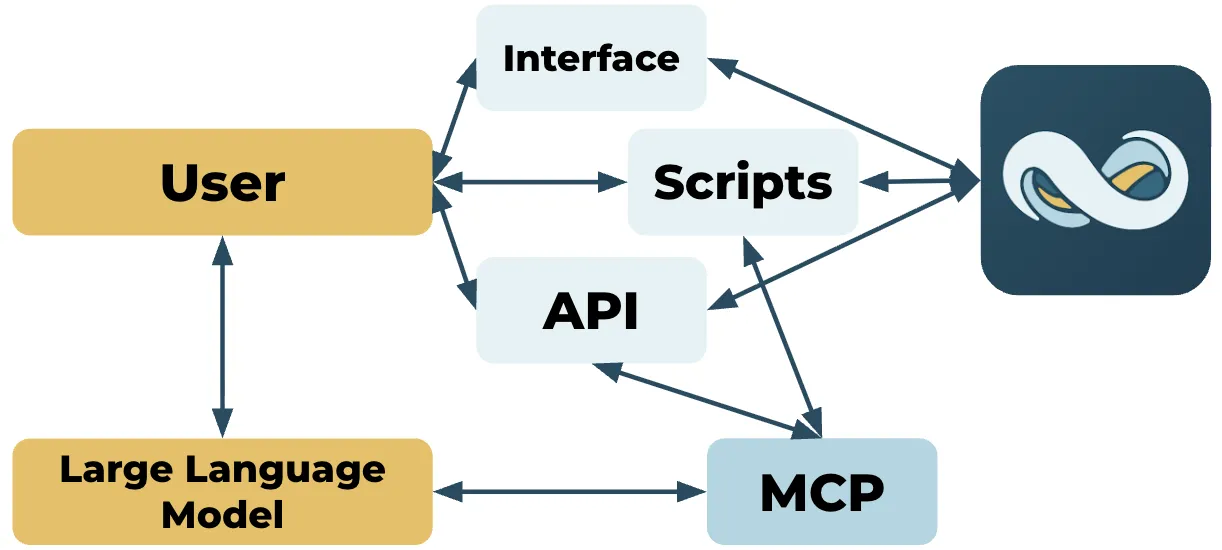
MCP, or Model Context Protocol, is a standard that helps AI systems connect to external data, tools and workflows in a structured way. In the NetSuite context, MCP acts as the layer between the AI system and NetSuite’s data, records and business logic.
This matters because ERP data is not ordinary business content. It includes transactions, customers, suppliers, subsidiaries, revenue, margins, cash positions, approvals and reporting structures. Connecting AI to this type of data requires more than a simple API call.
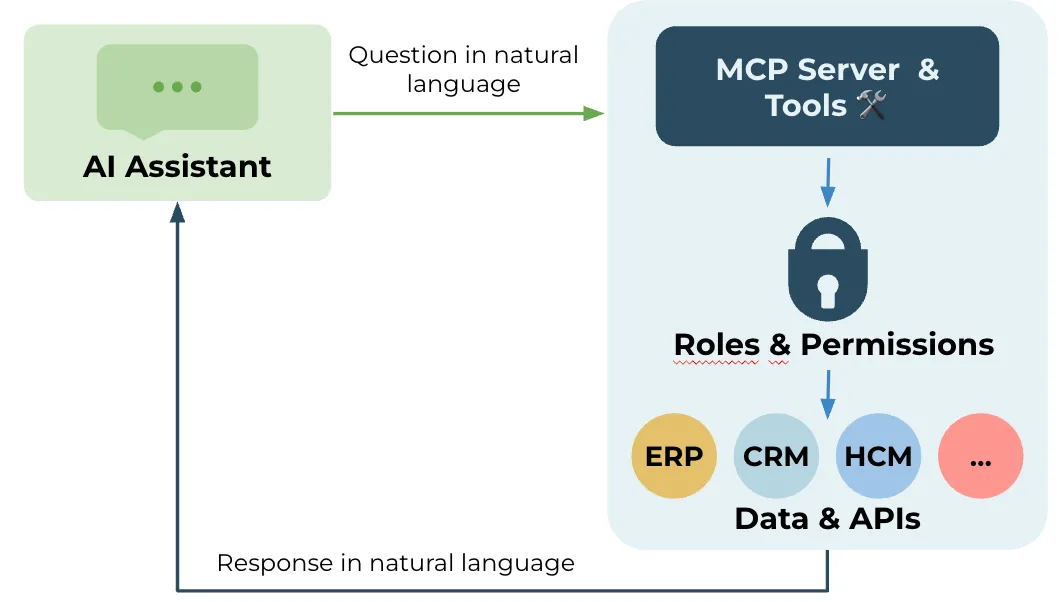
With MCP, companies can create a more controlled interaction model. The AI system does not simply “read everything”. It can use defined tools, follow permissions and return answers based on the access level of the user.
At a high level, the NetSuite AI Connector works by exposing approved NetSuite capabilities to external AI systems through MCP tools.
A typical flow looks like this:
This does not remove the need for ERP expertise. It changes the interface. Users can start from a business question instead of a report path, but the quality of the answer still depends on clean data, strong roles, clear saved searches, good workflows and a well-designed NetSuite environment.
Finance teams do not need more dashboards if they still have to spend hours explaining what changed. They need faster access to trusted answers.
The NetSuite AI Connector can help finance teams move from static reporting to conversational analysis. A CFO could ask why cash collection slowed down, which customers are driving DSO, or which transactions need review before close. The AI can then help surface the relevant data and structure an explanation.
This shift also connects with the broader evolution of NetSuite AI and NetSuite Next, where finance teams increasingly move from static navigation to conversational ERP workflows.
This is especially useful for growing European companies with multiple entities, currencies and reporting requirements. As companies scale, finance teams often face more data, more stakeholders and more manual reconciliation work. AI can reduce some of that friction, but only if it is connected to the right ERP foundation.
That is why the NetSuite AI Connector should be seen as part of a finance transformation roadmap, not as a standalone AI experiment.
Month-end close is one of the strongest use cases for AI-connected ERP data.
Finance teams can use the NetSuite AI Connector to ask questions such as:
The value is not that AI closes the books. The value is that it helps teams spot exceptions faster and focus their review where it matters most.
For finance teams, this is where AI becomes practical. It supports review, prioritisation and explanation, while the finance team keeps control over the close process.
Cash visibility is a recurring pain point for scaling companies. Finance teams often need to combine invoice data, payment behaviour, customer history and internal context before they can explain collection risk.
With the NetSuite AI Connector, an AR or finance user could ask:
Which customers are most likely to create a cash collection issue this month?
A useful answer could group customers by overdue balance, payment pattern, entity, account owner and recent transaction activity. The finance team can then validate the output and decide what action to take.
This is a good example of where AI should support decision preparation, not replace finance judgment.
Reporting is not only about producing numbers. It is about explaining what changed and why.
The NetSuite AI Connector can support first-draft commentary for recurring reporting cycles. For example, a finance team could ask:
Summarise the main drivers of revenue variance this quarter by subsidiary and customer segment.
The AI can help structure the answer, identify relevant movements and prepare a draft explanation. The finance team still validates the logic, adjusts the business interpretation and owns the final message.
This can be useful for board packs, investor reporting, management meetings and recurring business reviews.
The NetSuite AI Connector is not only relevant for finance users. Commercial teams can also benefit from governed ERP context.
Before a strategic customer meeting, a sales or account manager could ask:
What should I know before my renewal discussion with this customer?
If the user has the right permissions, the answer could include payment status, billing history, open invoices, product or service history, credit notes and relevant finance context.
The important boundary is access control. A commercial user should only see the NetSuite information that their role allows.
For companies using NetSuite for operations, purchasing or inventory, AI-connected ERP workflows can help teams investigate stock, supplier and fulfilment questions faster.
An operations user could ask:
Which items are at risk of shortage next month based on current stock, open purchase orders and recent demand?
The AI can help identify records that need review. The team can then validate the recommendation, adjust assumptions and decide whether to reorder, reroute or escalate.
This use case becomes more valuable when NetSuite is connected with operational systems, planning tools or supplier data. But the same rule applies: start with one workflow, one clear question and one controlled dataset.
The NetSuite AI Connector can also help internal teams reduce dependency on a small number of NetSuite power users.
For example, users could ask:
This is not a replacement for training or documentation. But it can reduce repetitive questions and make NetSuite easier to use for finance, operations and commercial teams.
The NetSuite AI Connector can create value through individual ERP prompts. But for many companies, the next question is how to scale AI across teams and systems.
Finance data often lives in NetSuite, but business context may also sit in CRM, support tools, productivity platforms, documents, spreadsheets or internal knowledge bases. This is where AI orchestration becomes important.
If your goal is to scale AI beyond individual NetSuite prompts, Dust for NetSuite can help turn ERP access into governed, cross-functional AI agents.
The difference is important. The NetSuite AI Connector enables secure access to ERP data. An enterprise AI platform can then help structure broader workflows across departments, provided governance and access controls remain clear.
The NetSuite AI Connector is only valuable if access remains controlled. Finance data is sensitive. It can include revenue, margins, supplier payments, customer balances, tax information and management reporting.
NetSuite’s documentation highlights permissions, required features, associated risks, controls and mitigation strategies as part of the AI Connector setup. NetSuite also states that MCP tools are governed by NetSuite’s role-based security model, meaning users and AI systems only access what is allowed for the role.
Before scaling AI-connected ERP workflows, companies should define:
For finance leaders, this governance model should be part of the business case from the start. AI should make work faster, but it should not create uncontrolled access to financial data.
The first step is not choosing an AI platform. The first step is checking whether your ERP foundation is ready.
AI will make weak data more visible. If customer records, vendor data, item structures, subsidiary mappings or payment terms are inconsistent, AI outputs will be harder to trust.
Before implementing the NetSuite AI Connector, review the quality of the data behind your first use case. Do not try to clean the entire ERP before starting. Focus on the dataset linked to the workflow you want to improve.
Role design is critical. The AI interaction should follow the same principles as normal NetSuite access.
If a user should not see payroll-related postings, sensitive margin data or specific subsidiary information in NetSuite, they should not access it through AI either. This is why role-based permissions must be reviewed before launch.
Strong first use cases are narrow, frequent and measurable. They usually involve a process that already happens every month or every week, uses structured NetSuite data and requires human review.
Good examples include close exception review, AR and overdue invoice analysis, variance commentary, internal NetSuite support, customer account preparation and recurring management reporting.
Avoid starting with broad prompts such as “analyse my business”. They are too vague and difficult to validate. Start with a workflow where the output can be checked.
AI should prepare the work. Humans should validate decisions.
For finance and operations workflows, this means setting clear rules around what AI can do. It may summarise, classify, draft, compare or recommend. But approvals, postings, financial decisions and customer-facing actions should remain controlled by the appropriate teams.
This keeps adoption practical, safe and auditable.
A practical implementation can be structured in five phases.
Start by identifying where AI could reduce friction. Map recurring finance and operations tasks, review pain points, check data availability and assess permissions.
The goal is to select one or two realistic use cases, not to build a company-wide AI strategy immediately.
The technical setup includes enabling the required NetSuite features, installing or configuring the relevant MCP tools, setting up authentication and validating access controls.
This phase should include testing with a limited group of users and a clearly defined role structure.
Once the connector is in place, define the workflow in business terms.
For each use case, document the user, question, data source, expected output, validation step and business owner. This prevents AI adoption from becoming a collection of disconnected experiments.
Test outputs against known data. If the AI summarises overdue invoices, compare the answer with NetSuite reports. If it drafts variance commentary, check the numbers and reasoning.
Testing should cover accuracy, permissions, usability and edge cases. Users need to understand when the AI is helpful and when they should verify the answer manually.
Only scale once the first use case is trusted. Expand gradually by adding new users, workflows or departments.
At this stage, governance becomes more important. Companies should document policies, monitor usage, review access and keep improving prompts, tools and workflows.
The NetSuite AI Connector is powerful, but it is not a shortcut around ERP fundamentals.
It will not fix poor master data. It will not redesign broken processes. It will not replace NetSuite administrators, finance controllers or integration specialists. It will not remove the need for security reviews, testing or change management.
It also should not be treated as a way to bypass reporting governance. If a report, saved search or workflow is unreliable, connecting AI to it may only make the issue more visible.
The best results come when AI is layered on top of a clean, well-governed NetSuite environment.
ROI should be measured at workflow level, not with generic AI productivity assumptions.
For each use case, define the current manual effort, frequency, business impact and risk level. Then compare the future process with AI support.
Useful metrics include:
Do not measure AI only by speed. Measure whether the output is trusted, used and connected to better decisions.
Novutech helps European growth companies approach NetSuite AI as part of a broader finance transformation roadmap. The objective is not to connect AI for the sake of innovation. The objective is to make finance, operations and commercial workflows more scalable.
With 250+ customers across Europe, 65+ experts in 8 countries, 100+ certifications and more than 90% client retention post go-live, Novutech combines NetSuite expertise with finance transformation experience. That matters because AI success depends on more than technical setup. It requires the right ERP architecture, data quality, permissions, process design and user adoption.
Novutech can support companies with AI readiness assessment, NetSuite AI Connector setup, use case selection, custom tool design, governance, user training and long-term optimisation.
If your team is already exploring NetSuite AI, the best next step is to identify where AI can create value safely and measurably.
The NetSuite AI Connector is not just another AI feature. It is a new way to connect ERP data with AI systems while keeping governance, permissions and business logic in place.
For finance and operations teams, the opportunity is clear. Less time searching. Less time exporting. Less time drafting repetitive explanations. More time validating, analysing and advising the business.
But the companies that benefit most will not be the ones that connect everything to AI first. They will be the ones that choose focused use cases, secure the right data, keep humans in control and build on a strong NetSuite foundation.
If you want to understand where the NetSuite AI Connector could create value in your finance or operations workflows, Novutech can help you assess your readiness, define the right use cases and build a practical roadmap.
The NetSuite AI Connector is a protocol-driven integration service that connects NetSuite with external AI systems through Model Context Protocol. It allows authorised users to interact with NetSuite data through AI while maintaining role-based permissions and governance.
MCP stands for Model Context Protocol. In NetSuite, MCP provides a structured way for AI systems to use approved tools, access authorised ERP data and interact with NetSuite workflows under defined security rules.
The NetSuite AI Connector is designed around governed access. NetSuite states that MCP tools follow the role-based security model, meaning users and AI systems only access what their role permits. Companies still need to configure roles, permissions, controls and monitoring correctly.
The best first use cases are narrow, repeatable and easy to validate. Examples include month-end close exception review, AR analysis, cash visibility, variance commentary, customer account preparation, operations analysis and internal NetSuite support.
Companies should start with an AI readiness assessment. Review the business workflow, data quality, permissions, expected output and validation process. Then launch one controlled use case before scaling to additional teams or workflows.
Let's discuss how we can help you move from complexity to clarity.